Crossing the Blues
Showing posts with label Media Player Skins. Show all posts

Free S.T.A.L.K.E.R. Skin for Windows Media Player


The Official S.T.A.L.K.E.R. - Shadow of Chernobyl Windows Media Player 11 Skin

THQ, is a leading worldwide developer and publisher of interactive entertainment software. Headquartered in Los Angeles County, California, THQ sells product through its global network of offices located throughout North America, Europe and Asia Pacific.

In 2005, THQ joined forces with The Skins Factory to create the S.T.A.L.K.E.R. - Shadow of Chernobyl Windows Media Player 10 skin. Now in 2007, the Windows Media Player skin is issued to S.T.A.L.K.E.R.s worldwide. Featuring a start-up animation with sound FX, S.T.A.L.K.E.R. WMP 11 is a "must have" for those entering the "zone".

© Copyright 2007. THQ. All Rights Reserved.

Author: theskinsfactory.com | skinsfactory.deviantart.com

Download Here

Free iChange Skin for Winamp Modern


iChange feat.toro

- Coverart -
Put "cover.jpg" in the same holder where .mp3 files are in.

- Display Image -
40 picture avaibable.
Images change automatically, when a tune changes.
You can toggle automatic change "on/off".

To replace with your images ,follow "Tips" in the archive.

-- Note --
MouseWheel can change Volume level.
"Desktop Alpha Blending" is required.
Preferences > Skins > Modern Skins > Alpha Blending

Author: takanory.deviantart.com

Download Here

Free 27 RGB Series RGB Skin for Winamp Classic


Winner of the 321 Skinning Contest, May 2006

Author: magneto-ms.deviantart.com

Download Here

Free Nintendo Skin for Windows Media Player 11


to Use:

d-pad up - open
d-pad down- stop
d-pad right - next
d-pad left - previous

a button - pause/play

graph - shuffle
arrows - repeat

- button - minimize
+ buttom - return to full mode

home button - open playlist window

power button - close

Author: ahalp.deviantart.com

Download Here

Free Zen Skin for Winamp Classic (Simplicity is Bliss)


Author: k-raki.deviantart.com

Download Here

Free Satin Skin for Windows Media Player 10


Author: skinister.deviantart.com

Downlaod Here

Free Silent Night Theme for iTunes

System Requirements

- Mac OS X version 10.4.10 or later
- iTunes 8.2(23)
- Quicktime 7.5.5 or later

Package Content

- iTunes (Executable file)
- iTunes.rsrc
- Localized.rsrc (English only)

How to install

Please make a backup of original files. and replace files to iTunes Resources folder.

- iTunes -> /Applications/iTunes.app/Contents/MacOS
- iTunes.rsrc -> /Applications/iTunes.app/Contents/Resources
- Localized.rsrc -> /Applications/iTunes.app/Contents/Resources/**.lproj

Author: dahlia-7.deviantart.com

Download Here

Free cPro Das Skin - Winamp ClassicPro Skin


cPro Das Skin - Winamp ClassicPro Skin with (few) Colorthemes. Enjoy.

Author: zrco | Website: deviantart.com

Download Here (.zip)

Free IRP Winamp Skin

Designed for people who often listen to internet radios.

Author: ej-design | Website: deviantart.com

Download Here
(.zip)

Free Live Winamp Compact Skin


Author: puglialemon | Website: deviantart.com

Download Here (.rar)

Free Bamboo Media Player Skin for Vista


Simply install the program and load the theme.
Works only with Vista Media Center.

Author: chuckdobaba | Website: deviantart.com

Download Application (MediaCenterFX w/ Aquarium Theme)
Download Bamboo Skin Here

Free Windows 7 Media Player 11 for XP


Instructions on how to install are included in the zip file.

Author: fediafedia | Website: deviantart

Download Here

Free Windows MediaPlayer Mega Skin Pack


Windows MediaPlayer Mega Skin Pack (70)

70 various Media Player Skins

Size : 90Mb

Author: Various | Website: Download Codes


Free Transformers Windows Media Player Skin


Excellent skin for Windows Media Player from a film Transformers

WMS-transformers-2008


Author: invetalcom | Website: Download Codes

Download Here
Mirror

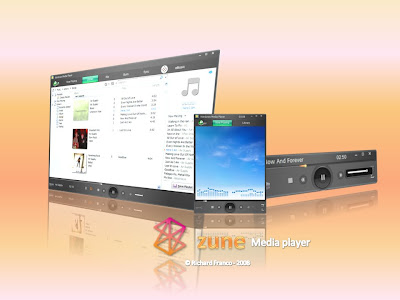
Free Zune Theme for Media Player


This is already an installer so you don't have
to do many setup to install it.,,


Also in this package the wfp switcher is included to disable windows file protection for a while
to make it work.,

Here are the instruction;;;;

for those who still didn't turn off the windows file protection

1. after you download it open it with winrar and extract it anywhere in your computer.

2. then restart your computer and press f8 then select safe mode and open the folder where you
extract the file and the run wfs then select turn off wfp.. restart your computer.
3. logon and then run the installer but be sure to backup first the original file which is wmploc.dll
to backup it just go to c:\windows\system32\wmploc.dll copy this wmploc.dll anywhere in your computer
so just you can restore it again to original dll.
4. Enjoy it!!!!


Author: edgexlasher | Website: devianart

Download Here